Quick answer: If you sleep on your side and the problem is a snoring partner or a noisy house, the Ozlo Sleepbuds 2 are the pick. They are the smaller, flatter bud, they last longer on a charge, and they are built only for sleep. The Soundcore Sleep A30 are the better value and the better fit if you want active noise cancelling, sleep tracking and the option to take a call, as long as a slightly bigger bud is comfortable in your ear.
One note before the details: Ozlo replaced its original Sleepbuds with Sleepbuds 2 in July 2026, so this comparison is the current Ozlo model against the Sleep A30. Soundcore also sells a Sleep A30 Special version with different battery figures, covered below.
Ozlo Sleepbuds 2 vs Soundcore Sleep A30 at a glance
Ozlo Sleepbuds 2
Soundcore Sleep A30
How they handle noise
Passive seal from silicone tips plus adaptive noise-masking sound. No active noise cancelling
Active noise cancelling, passive isolation and adaptive snore masking
Weight per bud
1.6 g
About 3 g
Battery per charge
Up to 14 hours
Up to 9 hours (45 hours with the case)
Case
Holds 2 to 3 extra charges; has noise, light and temperature sensors
Charging case for multiple nights
Sleep tracking
Sleep Patterns and bedroom environment insights in the Ozlo app
Sleep duration, position and snoring in the Soundcore app
Alarm only you hear
Yes, works even in Bluetooth-off mode
Yes
Phone calls
No (no microphone in the buds)
Yes
Streaming
Any Bluetooth audio; fades to masking once you fall asleep
Any Bluetooth audio, plus Calm Sleep Stories and a built-in sound library
Bluetooth
5.3
5.4
Water resistance
IPX4
IPX4
Tips in the box
4 sizes of silicone tips
Silicone tips, foam tips and ear wings in several sizes
Specs from ozlosleep.com and soundcore.com product pages, checked October 24, 2026. Sleep A30 Special lists 8 to 10 hours per charge and about 5 nights with the case.
The real difference: block and mask vs active noise cancelling
This is the choice that matters most, and it comes down to what keeps you up.
Ozlo takes a “block and replace” approach. The silicone tip seals the ear, and a steady masking sound (white noise, ocean, rain and dozens of other options) covers whatever leaks through. Ozlo says its own testing found this works better in a bedroom than active noise cancelling. Snoring is uneven and loud in bursts, and a constant sound layered over it is the classic way to make it fade into the background.
Soundcore stacks three tools. Active noise cancelling handles steady low sounds such as a fan, an air conditioner or road hum. The passive seal handles the rest, and adaptive snore masking adds a covering sound on top. If your noise problem is a constant drone rather than a person, active cancelling is the feature to look for.
Here’s what to look for: snoring partner, go Ozlo. Steady city or appliance noise, the Soundcore has the edge.
Comfort for side sleepers
Both brands design for side sleeping, but the numbers favor Ozlo. Each Sleepbud 2 weighs 1.6 g and stands 11 mm tall, which is small enough to sit mostly inside the ear. Soundcore lists the Sleep A30 at about 3 g per bud with a 3D shape that follows the curve of the ear, and it ships with foam tips and ear wings to help it stay put.
Fit is personal. If you have struggled with earbuds before, the lower profile is the safer bet. If regular earbuds have always felt fine, the A30’s wider range of tips gives you more ways to dial in a seal.
Battery: will they last the whole night?
Ozlo lists up to 14 hours per charge, which covers a long night plus a lazy weekend morning. Soundcore lists up to 9 hours per charge for the Sleep A30, with the case bringing the total to 45 hours.
For most people either one gets through a normal night. The Ozlo margin matters if you sleep long, nap in the afternoon, or wear them on red-eye flights.
Apps, alarms and tracking
Alarms: both have a private in-ear alarm, so a partner does not wake to it. Ozlo’s alarm still works with Bluetooth switched off.
Tracking: Soundcore reports sleep duration, sleeping position and snoring. Ozlo offers Sleep Patterns plus readings from sensors in the case for bedroom noise, light and temperature.
Content: Soundcore includes Calm Sleep Stories and a sound library with white noise and meditation tracks. Ozlo has 60+ built-in sleep sounds and lets you stream anything, then fades to masking when it detects you have fallen asleep.
Calls: only the Soundcore has microphones for calls. Ozlo left them out on purpose; these are sleep-only buds.
If you already use a sunrise alarm or sound machine, the Hatch Restore 3 vs Restore 2 comparison covers how a bedside device and sleep earbuds can split the job: the Hatch for wind-down light and a gentle wake, the buds for noise you cannot control.
Price and value, without the sticker shock
Ozlo is the more expensive of the two by a clear margin. Soundcore also sells a Special edition and runs promotions on its own site from time to time. Both brands list their sleep earbuds as HSA/FSA eligible on their own sites, so check your plan before you buy with pre-tax dollars. Ozlo’s own store also offers a 30-day return window, which is worth using for something as personal as fit.
Who should buy which
Buy the Ozlo Sleepbuds 2 if you share a bed with a snorer, sleep on your side, want the longest battery, and do not need calls or noise cancelling.
Buy the Soundcore Sleep A30 if your noise is a steady hum, you want sleep and snore tracking, you like the idea of taking calls in the same buds, or you want the better value.
Skip both if you have ear pain, frequent ear infections or a perforated eardrum. Ask your doctor before wearing anything in your ears all night.
It depends on the noise. Ozlo’s passive seal plus masking sound is built around snoring and uneven bedroom noise, and the buds are smaller with a longer battery. Soundcore adds active noise cancelling, sleep tracking and calls, which suits steady noise and people who want more features for less.
Is the Soundcore Sleep A30 any good?
On paper it is one of the most complete sleep earbuds available: active noise cancelling, snore masking, sleep and snore tracking, a private alarm and up to 45 hours with the case. The main trade-off is size, at about 3 g per bud.
Do Ozlo Sleepbuds 2 have noise cancelling?
Not active noise cancelling. Ozlo uses a passive seal from the silicone tips plus adaptive noise-masking audio that covers sounds that get through.
Can you take calls with Ozlo Sleepbuds?
No. The Sleepbuds have no microphone. The Soundcore Sleep A30 does support calls.
What is the difference between the Sleep A30 and the Sleep A30 Special?
Soundcore sells both. The Special comes in different colors and lists 8 to 10 hours per charge with about 5 nights from the case, and it switches automatically from Bluetooth to stored audio once you fall asleep.
What are good alternatives to the Soundcore A30 for sleep?
The Ozlo Sleepbuds 2 are the main alternative built only for sleep. If you would rather not wear anything in your ears, a bedside sound machine such as the Hatch Restore 3 covers masking sound from across the room.
Sources
Sources checked on October 24, 2026. Figures from brands are reported as the brand’s own claims.
Quick answer: Buy the Hatch Restore 3. Hatch has stopped making the Restore 2, so the real question is whether a leftover Restore 2 on sale is worth it. The Restore 3 adds a press-and-turn dial, a Swap button that changes your wind-down routine without your phone, fuller sound, a brighter and smoother sunrise, and more saved routines. A discounted Restore 2 still makes sense if you only want a basic sunrise alarm and white noise.
Press-and-turn dial on top, plus Swap and Pause buttons
Two flat Rest and Rise buttons, side brightness buttons
Brightness
Set in the app
Physical buttons
Sunrise
Brighter, with smoother color changes
Slightly dimmer
Sound
Redesigned speaker, fuller sound
Thinner sound
Saved wind-down routines
Three, switchable on the device
Two, switched in the app
Screen in the bedroom
No
No
Hatch Restore 3. Product photo: Hatch.
What changed on the Restore 3
Controls you can use half asleep. The big dial on top presses to start and turns to change volume. A Swap button cycles through your saved wind-down routines and a Pause button stops sound, all without picking up your phone.
Better sound. Hatch rebuilt the audio hardware and software. Reviewers describe it as fuller and less tinny, which matters for white noise and sleep sounds you play all night.
A better sunrise. The light gets brighter at full strength and moves through colors more smoothly, so the wake-up feels more like morning light.
More routines. It saves three wind-down routines instead of two.
A phone-free bedtime feature in the app tracks screen-free nights if that is a habit you are building.
What stayed the same
Same Hatch Sleep app for setting alarms, sounds and routines.
No screen, no sleep scores and no wearable. It is a light and sound machine, not a tracker.
Sunrise alarm, white noise and a starter set of sounds work without a subscription on both.
Is the Hatch+ subscription worth it?
You do not need it. Without Hatch+, you get white noise, a handful of soundscapes, basic sunrise alarms and two wind-down routines. Hatch+ adds the full sound library, guided meditations, bedtime stories and more alarm sounds, plus the third routine on the Restore 3. Try the free trial before committing, and cancel if you only use white noise and the sunrise.
Who should buy which
Buy the Restore 3 if you want the easiest nightly routine, the better speaker and a sunrise that feels closer to real morning light. It is the only one Hatch still makes.
Buy a discounted Restore 2 if you find one new at a real markdown and only need a sunrise alarm and white noise.
Look at Hatch’s sleep clock instead if you want sleep tracking and insights, which the Restore line leaves out on purpose.
A note for midlife sleep: a gentle sunrise and a consistent wind-down routine are low-effort habits that support a steadier sleep schedule. If night waking or hot flashes are what keep you up, mention it to your doctor, since a sunrise clock will not fix those on its own.
Is the Hatch Restore 2 discontinued? Yes. Hatch says it no longer makes the Restore 2 and points buyers to the Restore 3.
Is the Restore 3 worth upgrading to from the Restore 2? Only if the Restore 2’s controls or sound bother you. If yours works and you like it, there is no urgent reason to replace it.
Does the Hatch Restore 3 need a subscription? No. The sunrise alarm, white noise and some sounds are free. Hatch+ is optional.
Can you change the brightness on the Restore 3 without the app? No. Brightness moved into the app. The dial on the device controls volume.
Does the Restore 3 track sleep? No. It has no sleep tracking or scores.
Create Creatine Gummies deliver 4.5 g of creatine monohydrate in three gummies, sealed in single-serve packets: no scoop, no shaker bottle, no measuring. The format is the actual product here. I bought the variety pack first so I could work out which of the five flavours I would repurchase, and it turned out to be sour peach.
Tested and written by Anna Katherine, who reviews products on video before writing about them. Last updated 24 August 2026.
Key takeaways
4.5 g creatine monohydrate per packet, in three gummies
Single-serve packets: the real selling point, not the gummy format
Five flavours in the variety pack: orange, sour green apple, watermelon, sour peach, blue raspberry
2 g sugar per serving, roughly 4% of daily value
Gluten-free, non-GMO, no artificial colours
No aftertaste: the failure mode of most gummy supplements
What are Create Creatine Gummies?
They are creatine monohydrate in gummy form, portioned into individually sealed daily packets rather than sold as a tub of powder. Each packet holds three gummies totalling 4.5 g of creatine monohydrate, and the directions are one packet per day.
The variety pack ships as 30 single-serve packets, a month of daily servings, split across the five flavours.
For context, 4.5 g sits inside the 3–5 g daily range most commonly cited for creatine monohydrate maintenance, so this is a standard serving rather than a token amount, which is not always true of supplement gummies.
Create Creatine Gummies Variety Pack Review: Best Flavor? · Watch on YouTubeCreate Creatine Gummies: Legit Alternative to Powder Creatine? · Watch on YouTube
This was my main question before buying, because a gummy is not automatically a nice gummy. Plenty of gummy supplements have a chalky or vitamin-ish aftertaste that puts you off taking them, which defeats the point.
These do not have that. They are soft and chewy with a sour coating on the outside, and they are roughly the size of a quarter. I would call myself a gummy connoisseur and I genuinely could not tell there was creatine in them.
My favourite is sour peach, with sour green apple a close second. The sour coating is what makes them work: it covers anything that might otherwise read as supplement.
Why the packets matter more than the gummies
The gummy format gets the attention, but the single-serve packet is the part that changed anything for me. No scooping, no measuring, no washing a shaker bottle, no tub taking up counter space.
A packet goes in a handbag, a work bag, a gym bag, or the glovebox. I know myself well enough to know I stick with a routine when the routine is genuinely easy, and pre-portioned removes every step where I might not bother.
That is the honest case for this product. If powder in a tub has never bothered you, the packets are a convenience you are paying extra for.
Why buy the variety pack first?
Because flavour preference is not predictable, and buying a single flavour first is a gamble. The variety pack let me try all five and work out which two I would actually repurchase.
It also solves a smaller problem: taking the same flavour every day gets dull. Rotating five keeps it closer to a daily treat than a daily chore, which again is really a consistency argument.
Who should skip these?
Anyone happy with creatine powder. Powder is substantially cheaper per gram. You are paying for portioning and taste, and if neither is a barrier for you, there is no reason to switch.
Anyone watching added sugar closely. 2 g per serving is small, but it is not zero, and powder is zero.
Anyone pregnant, breastfeeding, or on medication. Talk to your doctor before adding any supplement. That is a question for them, not for a blog.
Anyone who wants to adjust their dose. Packets are fixed at 4.5 g. Powder lets you change the amount; these do not.
Frequently asked questions
How much creatine is in Create Creatine Gummies?
4.5 g of creatine monohydrate per packet, split across three gummies. That is one daily serving according to the directions.
Do Create Creatine Gummies taste good?
Yes. They are soft and chewy with a sour outer coating and no supplement aftertaste, which is the usual failure mode for gummy supplements. Sour peach and sour green apple are the two I repurchase.
How many gummies are in a serving?
Three gummies, sealed together in one single-serve packet. Each is roughly the size of a quarter.
How much sugar is in Create Creatine Gummies?
2 g per serving, about 4% of the daily recommended value. They are also gluten-free, non-GMO, and made without artificial colours.
How many packets are in the Create variety pack?
30 single-serve packets, which is a month of daily servings, split across the five flavours.
What flavours does the variety pack come in?
Five: orange, sour green apple, watermelon, sour peach, and blue raspberry.
Are creatine gummies better than creatine powder?
Not better, different. Powder is cheaper per gram and lets you adjust the dose. Gummies are pre-portioned and portable, which matters if the friction of scooping and washing a shaker is what stops you being consistent.
When should you take creatine gummies?
The directions say one packet per day. I take mine in the morning because attaching it to something I already do every day is what makes it stick.
Is the variety pack worth it over a single flavour?
For a first purchase, yes. You find out which flavours you actually want before committing to a box of one, and rotating them keeps it from getting monotonous.
I stare at multiple screens for eight-plus hours a day working from home, so blue light glasses are non-negotiable for me. I have owned designer frames with blue light lenses, and honestly these inexpensive VISOONE glasses have replaced them. Here is my honest review of the pair I actually reach for.
Quick answer: Yes, I recommend them. The VISOONE blue light glasses look like real designer frames, not goofy, feel professional on camera, and come with a hard case and cleaning cloth. I paid a fortune for Dior and Chanel frames with blue light lenses and did not think it was worth it. These get me compliments in virtual meetings for a fraction of the price.
Why I love them
Mine are the River style in a tortoise color, a mix of brown and black that is classy and goes with everything. The best part is they look like real frames, the kind you would get from the optometrist, so I never feel goofy wearing them. They give off a polished, professional vibe, which matters when you are on camera all day.
Stylish frames that look designer, not cheap
Professional enough for virtual meetings and client calls
Come in multiple colors, I am eyeing a bolder cobalt or red next
Include a nice hard case and a cleaning cloth
Designer frames versus these
I have bought Dior and Chanel eyeglasses and had blue light lenses put in, and looking back, paying all that money for the frames was not worth it. These give me the same professional look and the blue light protection I need, and I have gotten so many compliments on them in virtual meetings. When people keep complimenting them, that is when you know they are good.
Great for travel and the office
As an Amazon Associate I earn from qualifying purchases, at no extra cost to you.
The hard case is what makes them easy to live with. I toss it in my laptop bag whenever I have to go into the office or meet with clients, so my glasses stay protected and clean on the go.
For the price, absolutely. They look like designer frames, feel professional on camera, and include a hard case and cloth. I preferred them to the pricey designer frames I used to buy.
Do blue light glasses actually help with screen time?
Many people who work long hours on screens wear them to help reduce eye strain. As someone on screens eight-plus hours a day, they are a must-have in my routine.
Do they look professional on video calls?
Yes. They look like real optometrist frames, and I have gotten many compliments on them during virtual meetings.
What comes in the box?
The glasses, a hard protective case, and a cleaning cloth, which makes them easy to travel with.
I do not usually rebuy the same product twice, but I am now on my second Beechmore Books London notebook, and I already want a third. If you take handwritten notes at work and want something that looks and feels far more premium than a legal pad, this is the one I reach for. Here is my honest review.
Quick answer: Yes, it is worth it. The Beechmore Books notebook is a vegan leather journal with thick, luxurious pages and a hidden folio pocket in the back. As someone working in corporate, it instantly levels up how I look taking notes in meetings. I have bought it twice and would again.
What makes it feel so premium
The first thing you notice flipping through it is how thick and substantial the pages are. It reads as luxurious and professional the moment you set it on a conference table. It is made with vegan leather, so you get that soft, high-end cover feel without the leather. I have the extra large size, which is my favorite for real note-taking, and this time I went with the green after loving my first one in black.
The little details I love
Thick, high-quality pages that do not feel flimsy
A soft vegan leather cover that looks expensive
A hidden folio pocket in the back for loose papers and cards
Comes in multiple colors and sizes, so you can match your style
Who it is for
As an Amazon Associate I earn from qualifying purchases, at no extra cost to you.
If you work in a professional or corporate setting, this is a must-have. Walking into a meeting with a notebook this polished quietly ups your whole presentation next to colleagues. It also makes a genuinely nice gift for anyone who journals or takes notes. For me, it is a small thing that makes the workday feel more put together.
For a professional notebook, yes. The page quality and vegan leather cover feel genuinely premium, and I have purchased it twice, which is the best endorsement I can give.
Is it real leather?
No, it is made with vegan leather, so you get the soft, high-end look and feel without animal leather.
Is it good for work and meetings?
Very. It looks polished and professional on a conference table, which is exactly why I use mine for taking notes at the office.
Does it have a pocket?
Yes, there is a handy hidden folio pocket in the back for loose papers and cards.
If you just got an iPad and want it to feel like writing on real paper, a matte screen protector is the upgrade. I bought the KCT Paperfeel protector with my own money and tested it, install and all. Here is my honest review plus a simple step by step so you can put yours on bubble-free the first time.
Quick answer: Yes, I recommend it. The KCT Paperfeel protector genuinely feels like paper, it was easy to install with the included kit, and it comes two to a pack. As someone new to iPad, I would absolutely repurchase it.
What comes in the box
The KCT Paperfeel kit is well thought out for a first-timer. Mine came with two screen protectors, an install guide, an alcohol wipe, a microfiber cloth, alignment tab stickers, little rubber positioning mats, and a scraper tool for smoothing bubbles.
How to install it, step by step
Set your iPad on the little rubber mats to hold it in place
Clean the screen thoroughly with the alcohol wipe, then buff with the microfiber cloth
Line up the protector and apply the three tab stickers at the bottom, following the guide so everything faces the right way
Once it is lined up perfectly, peel off the backing that sticks to the screen
Lay it down and use the scraper tool to smooth out any bubbles, and that is it
The tab-sticker system is what makes it easy. It lets you get the alignment perfect before you ever peel the adhesive, so you are not fighting a crooked protector.
My honest verdict
As an Amazon Associate I earn from qualifying purchases, at no extra cost to you.
It was genuinely easy to install, and the paper-like texture is the real draw. Writing and drawing feel so much more natural than on bare glass. For anyone new to an iPad, or anyone who takes handwritten notes or sketches, I could not recommend it enough, and I would repurchase it.
Does the KCT Paperfeel screen protector really feel like paper?
Yes. It has a matte, slightly textured surface that makes writing and drawing feel much more like real paper than smooth glass does.
Is it hard to install?
No. The kit includes alignment tab stickers, rubber positioning mats, a cleaning wipe, and a scraper, so you can line it up perfectly before peeling the adhesive and smooth out bubbles easily.
Is a paper-feel protector good for note-taking?
Very. The added texture gives your pencil more grip and control, which makes handwriting and sketching feel natural.
I get the question a lot, so I finally put the Navage to the test on camera, no filter and no cutting away from the gross part. If you have wondered whether a powered nasal wash is worth it or just a gimmick, here is my honest first-try review, results and all.
Quick answer: Yes, in my honest first test it worked. The Navage flushed out a genuinely shocking amount of mucus, and I could breathe clearly through both nostrils right after. It is a powered saline nasal wash, and for congestion and allergy season it earned a daily spot in my routine.
The Navage is a powered nasal irrigator. You fill it with warm water, drop in a saline SaltPod, seal it gently over both nostrils, and it uses suction to flush saltwater through your sinuses and pull out the mucus and gunk hiding in there. Think of it as a hands-free, powered version of a neti pot.
How to use it
Fill the tank with warm water, the temperature the instructions call for
Drop in a saline SaltPod, foil side down, and let it mix
Shake gently so the salt solution dissolves
Fit it over both nostrils, breathe through your mouth, and do not talk
Press the button and let it run
One tip from my first go: lean over the sink. It can drip a little when you finish, so do not do what I did and skip the towel.
My honest results
I showed the results on camera no matter how gross, and it was gross in the best way. The amount of mucus that came out was honestly a little shocking. Right after, I could breathe clearly through both nostrils and everything felt genuinely cleaner. The saline made my sinuses feel fresh, and I could immediately tell how much it would help me during allergy season. This was not sponsored, and those were my real results.
Does the Navage actually work, and who is it for?
For me, yes. If you deal with congestion, allergies, or sinus pressure, this is worth a serious look. The first rinse feels strange if you have never done a nasal wash, but it is not painful, and the payoff is being able to breathe. I have put it on my daily to every-other-day routine.
What to know before you buy
It can drip, so lean over the sink and keep a towel nearby
The SaltPods are a recurring cost, so factor those in over time
Follow the water temperature and pod instructions, they matter for comfort
Where to get it
As an Amazon Associate I earn from qualifying purchases, at no extra cost to you.
If you want to try it for yourself, here is the exact one I tested.
In my honest test, yes. It flushed out a surprising amount of mucus and I could breathe clearly through both nostrils immediately after. Results vary by person, but for congestion and allergies it worked well for me.
Is the Navage worth it?
If you regularly fight congestion, allergies, or sinus pressure, it is worth it. Just remember the saline SaltPods are an ongoing cost on top of the device. Check the current price on Amazon.
Does the Navage hurt?
It does not hurt. The first time feels strange because water is moving through your sinuses, but with warm water and the correct saline pod it is comfortable.
How often should you use the Navage?
I use mine daily to every other day, especially during allergy season. Follow the product guidance for your situation.
Last updated: June 5, 2026 · By Anna Katherine Page
This post contains affiliate links. If you buy through them I may earn a small commission, at no extra cost to you. I only recommend products I actually use.
Quick answer: The Logitech K270 wireless keyboard sets up in about 30 seconds. The tiny USB receiver lives inside the keyboard box (do not throw it away), the batteries are already installed, and you only need to plug in the receiver and flip the on switch. No Bluetooth, no pairing, no driver install. The battery lasts about two years and the deck is spill-proof.
If you just unboxed a Logitech K270 wireless keyboard, this is the entire setup. From cardboard to typing in under a minute, no Bluetooth pairing or app downloads, with a couple of quiet features that make it punch above its price.
Why the Logitech K270 wireless keyboard is worth it
For under a typical big-box price you get a full-size keyboard with a number pad, no cable cluttering your desk, no Bluetooth pairing headaches, and a battery that lasts about two years. The Logitech K270 wireless keyboard is the kind of unsexy daily-driver tech that you stop noticing within a week because it just works.
What is in the Logitech K270 wireless keyboard box
The Logitech K270 wireless keyboard itself
A tiny USB receiver (this is the most important part, do not lose it)
Two AAA batteries (already installed in the keyboard)
A small instruction card
The single most important moment when you open the box is finding the USB receiver. It is a small black tab and it tucks into a slot in the keyboard or the packaging. That little piece is what makes the keyboard wireless without Bluetooth.
How to set up the Logitech K270 wireless keyboard in 30 seconds
Find the USB receiver. Check the slot in the keyboard or inside the cardboard packaging. Set it aside where you can see it.
Confirm the batteries are in. They are usually pre-installed. Pop the battery cover on the back if you want to double check.
Plug the receiver into a USB port on your computer.
Flip the on switch. The on/off switch lives on the back or side of the keyboard. Slide it to on.
Start typing. Your computer will auto-detect the keyboard. No driver install, no pairing, no app.
That is the entire setup. From sealed box to typing in about 30 seconds.
Features I love
About a two-year battery life. You forget the keyboard is even wireless because you almost never change the batteries.
Spill-resistant deck. Worth knowing if you keep coffee or tea near the keyboard, which I do every morning.
Full size with a number pad. Great for spreadsheets, accounting, and anyone who actually uses the number row.
No Bluetooth needed. The little USB receiver means no pairing dropouts, which can be a real annoyance on cheaper wireless keyboards.
Quiet, low-profile keys. Pleasant to type on for long sessions.
Who this keyboard is for
The Logitech K270 wireless keyboard is a fit for a home office setup where you want full-size typing, no cables, no fuss, and a multi-year battery. It is also great as a guest or kids-room keyboard since the setup is so foolproof. If you want a mechanical keyboard or RGB lighting, this is not it, and that is fine.
Key takeaways
The Logitech K270 wireless keyboard sets up in about 30 seconds without Bluetooth or drivers.
The tiny USB receiver is the most important part of the box. Do not throw it away.
Battery life is about two years and the keyboard is spill-resistant.
Full-size with number pad makes it a great everyday home office keyboard.
Frequently asked questions
Does the Logitech K270 wireless keyboard use Bluetooth?
No. It uses a small USB receiver that plugs into your computer. There is no Bluetooth pairing required, which avoids the dropout issues that plague some Bluetooth keyboards.
How long does the Logitech K270 battery last?
About two years on the included AAA batteries with normal daily use.
Is the Logitech K270 wireless keyboard spill-proof?
It is spill-resistant. Small accidental spills like coffee or tea should not destroy it, but you should still wipe up promptly.
Do I need to install drivers for the Logitech K270?
No drivers needed for basic use. The keyboard works as soon as you plug in the USB receiver and turn it on.
What USB receiver does the Logitech K270 use?
It uses a Logitech Unifying receiver, which can pair with multiple Logitech peripherals on one receiver if you have other Logitech mice or keyboards.
Can the Logitech K270 wireless keyboard work with Mac?
It is primarily designed for Windows, but the basic typing keys work with Mac when the receiver is plugged in. A few Windows-specific keys may not have Mac equivalents.
About Anna Katherine
I share the real version of building a home office, a small business, and a budget setup on a budget. Honest picks, no sponsored hype. Follow on TikTok and YouTube.
This post contains affiliate links. I earn a small commission if you purchase through my link, at no extra cost to you.
Here are three pieces I've been reaching for lately, all chosen for the same vibe: weekend getaway. Each one stands on its own but they work even better together.
1. Orange Flower Euroflax™ Premium Linen Mini Dress , $298
Embrace effortless charm in the Orange Flower Euroflax™ Premium Linen Mini Dress by FARM Rio. This playful piece features an asymmetrical neckline that beautifully frames the silhouette, while the shapeable flower detail at the bust adds a sculptural and versatile touch. The vibrant orange floral patterns dance across breathable Euroflax™ linen, a sustainable, GMO-free fabric celebrated for its softness and natural thermoregulation. Light and airy, this dress effortlessly blends Brazilian spirit with conscious comfort, inviting joyful movement wherever you go. Closure: Invisible Zipper At Center Back Sleeve type: Sleeveless I love how it slots into the weekend getaway feel without trying too hard.
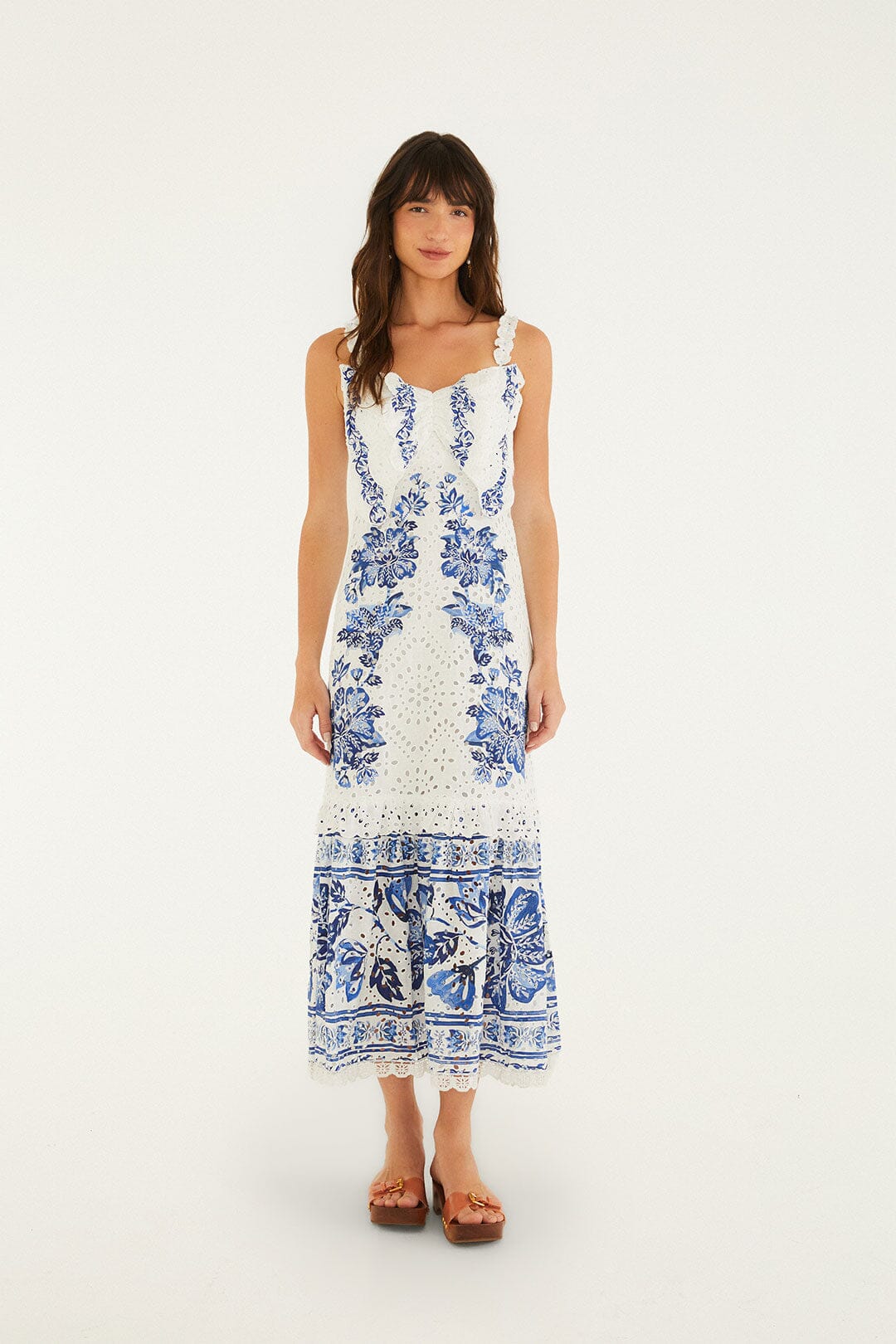
Breathe in timeless elegance with this Off-White Beautiful Nature Eyelet Midi Dress. Crafted in delicate eyelet fabric, it showcases a sweetheart neckline adorned with playful ruffles and charming floral appliqué straps. The dress features a harmonious blend of intricate blue botanical patterns, flowing into a gently flared midi silhouette that moves with grace. This piece radiates warmth and whimsy, inviting you to embrace effortless beauty under the sun. Sleeve type: Sleeveless I love how it slots into the weekend getaway feel without trying too hard.
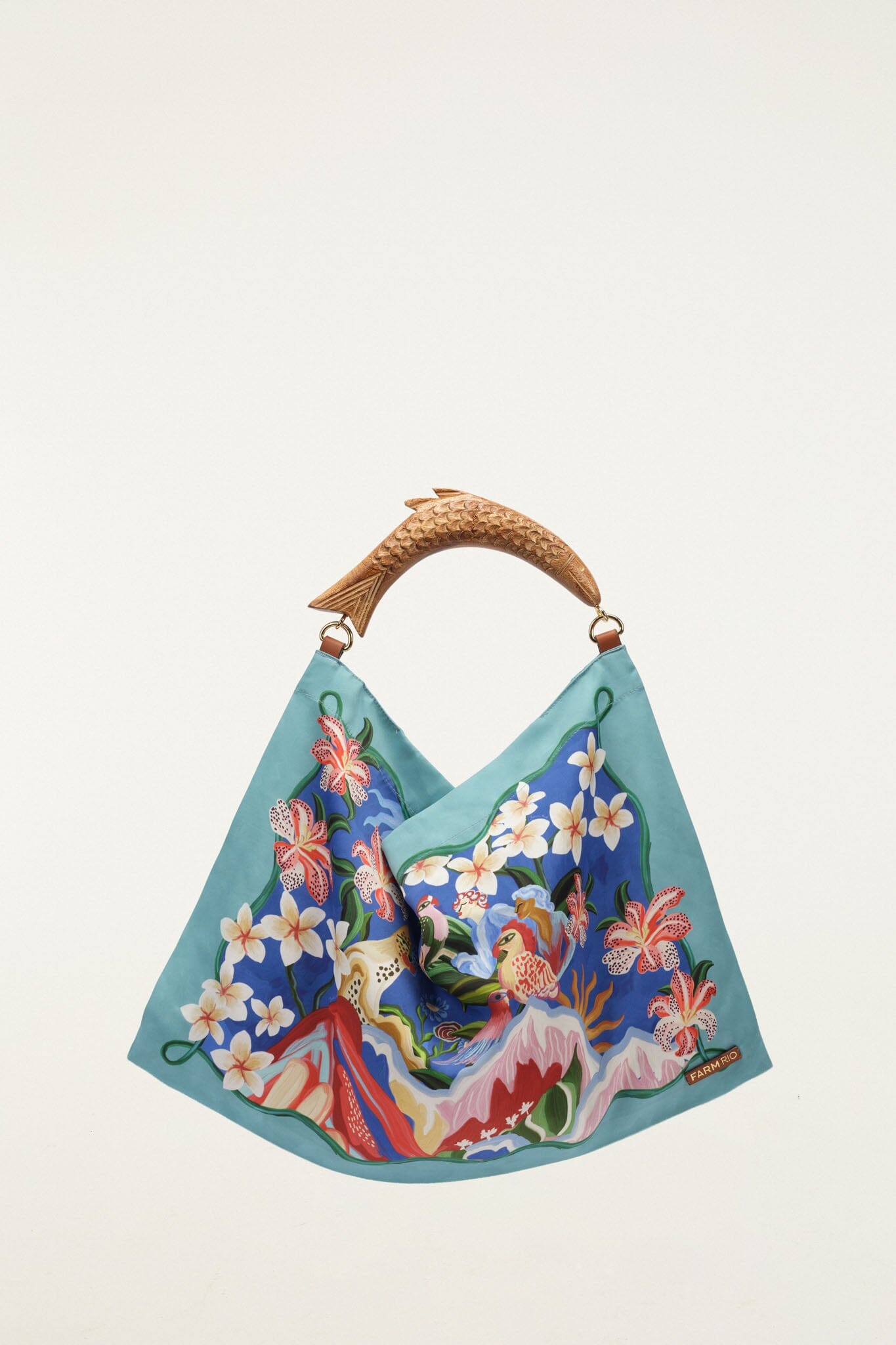
Light Blue Satin Small Scarf Bag captures the joyful spirit of FARM Rio with its vibrant floral print blending soft blues, lush greens, and bursts of warm hues. The unique carved wooden handle, shaped like a fish, adds an artisanal touch that feels both playful and elegant. Its fluid scarf-like silhouette flows effortlessly, inviting you to carry a piece of tropical warmth and soulful charm wherever you go. I love how it slots into the weekend getaway feel without trying too hard.
This post may contain affiliate links. I may earn a small commission at no extra cost to you if you make a purchase through these links. I only recommend products I personally use and love.
Quick answer: These eight Montessori inspired activities for toddlers build fine motor skills, problem solving and hand eye coordination through independent play, starting with a learning clock, a shape sorter and spinning gears. Research from the NAEYC finds play based learning is one of the most effective ways to build early childhood skills.
8 Montessori Activities for Toddlers That Build Skills Through Play
These montessori activities for toddlers are designed to support your child’s natural curiosity and development through hands-on, independent play. Research from the National Association for the Education of Young Children (NAEYC) confirms that play-based learning is one of the most effective ways to build cognitive, motor, and social skills in early childhood. Here are 8 montessori activities for toddlers that make learning feel like fun.
As parents, we want the best for our little ones, especially when it comes to their development. The Montessori approach to learning emphasizes hands-on, sensory-rich activities that encourage your child’s natural curiosity and foster essential developmental milestones. For babies aged 6-12 months, this Montessori-inspired activity set is a perfect tool to promote sensory awareness, fine motor skills, and early problem-solving abilities.
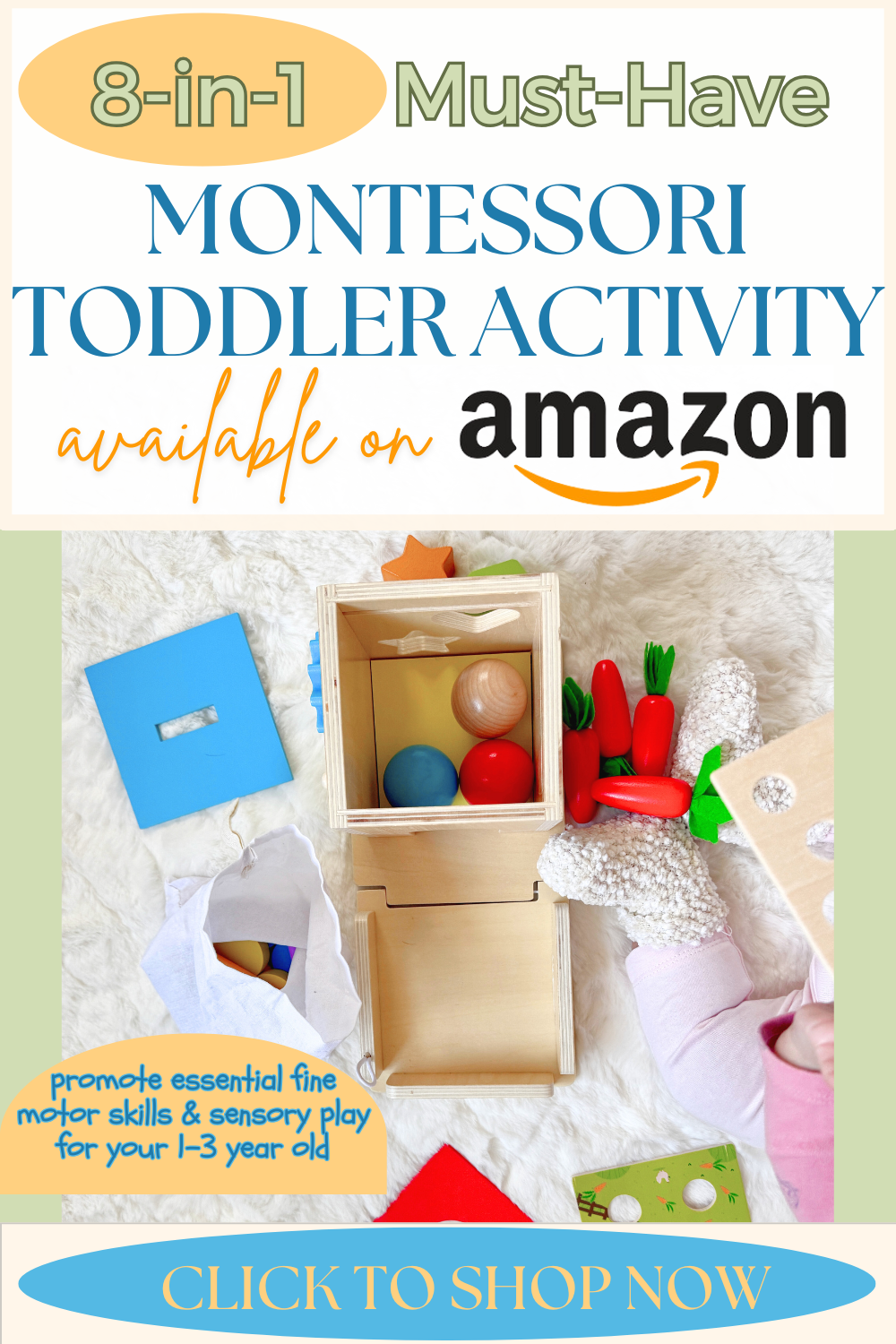
This thoughtfully designed activity set features 8 engaging and educational activities that align with the Montessori philosophy. Let’s explore how each activity provides unique benefits for your baby and makes playtime both fun and meaningful!
1. Learning Clock
Introduce your baby to the concept of time with this colorful learning clock. The movable hands and numbers encourage shape recognition and fine motor skills while laying the groundwork for time-related concepts in the future.
2. Shape Sorter
The classic shape sorter enhances your baby’s problem-solving abilities and spatial awareness. By matching shapes to their corresponding slots, your baby develops hand-eye coordination and a better understanding of geometry.
3. Spinning Gears
Turn, twist, and explore! The spinning gears captivate your baby’s attention while promoting fine motor development and cause-and-effect learning. It’s an engaging activity that keeps little hands busy.
4. Sorting Stacking Board
Stacking and sorting rings or blocks by size and color encourages your baby to develop color recognition and logical thinking. This activity also helps improve grasping and hand strength.
5. Ball Drop Game
The ball drop game introduces object permanence, helping your baby understand that objects exist even when out of sight. Dropping the ball and watching it reappear is both exciting and educational.
6. Color Matching Sticks Drop Game
This activity involves matching colored sticks to their corresponding holes, which enhances color recognition and fine motor precision. It’s a fun challenge that improves focus and patience.
7. Coin Bank
Encourage early saving habits while building hand-eye coordination with this coin bank activity. Dropping coins into the slot is a simple and rewarding way for babies to develop fine motor skills and concentration.
8. Carrot Harvest Game
The carrot harvest game features removable carrots of various sizes, teaching size differentiation and improving pincer grip. It’s a delightful activity that introduces concepts of farming and nature.
Why Parents Love This Activity Set
Durable and Safe: Made from high-quality, non-toxic materials, this set is built to last and safe for little hands and mouths.
Educational Value: Every activity is carefully designed to align with Montessori principles, ensuring your baby’s playtime is productive and meaningful.
Multi-Use: Perfect for independent play or parent-child bonding sessions.
Great Gift: Ideal for baby showers or birthdays, this set offers lasting value for babies and their families.
Ready to Elevate Your Baby’s Playtime? This Montessori-inspired activity set is a must-have for parents who want to support their baby’s natural curiosity and growth. Click the link below to shop now and watch your little one’s development thrive!
Shop the Best Montessori Activities for Toddlers
Here are some of my favorite Montessori-inspired toys perfect for babies and toddlers:
Kizfarm 8-in-1 Wooden Montessori Play Kit – Shape sorting, stacking, carrot harvest, coin bank & more: Shop on Amazon
PEBIRA Montessori Sorting & Stacking Toys – Wooden color recognition shape sorter for 1-3 year olds: Shop on Amazon
Montessori Wooden Sensory Toddler Toys – Educational learning toy for fine motor skills: Shop on Amazon